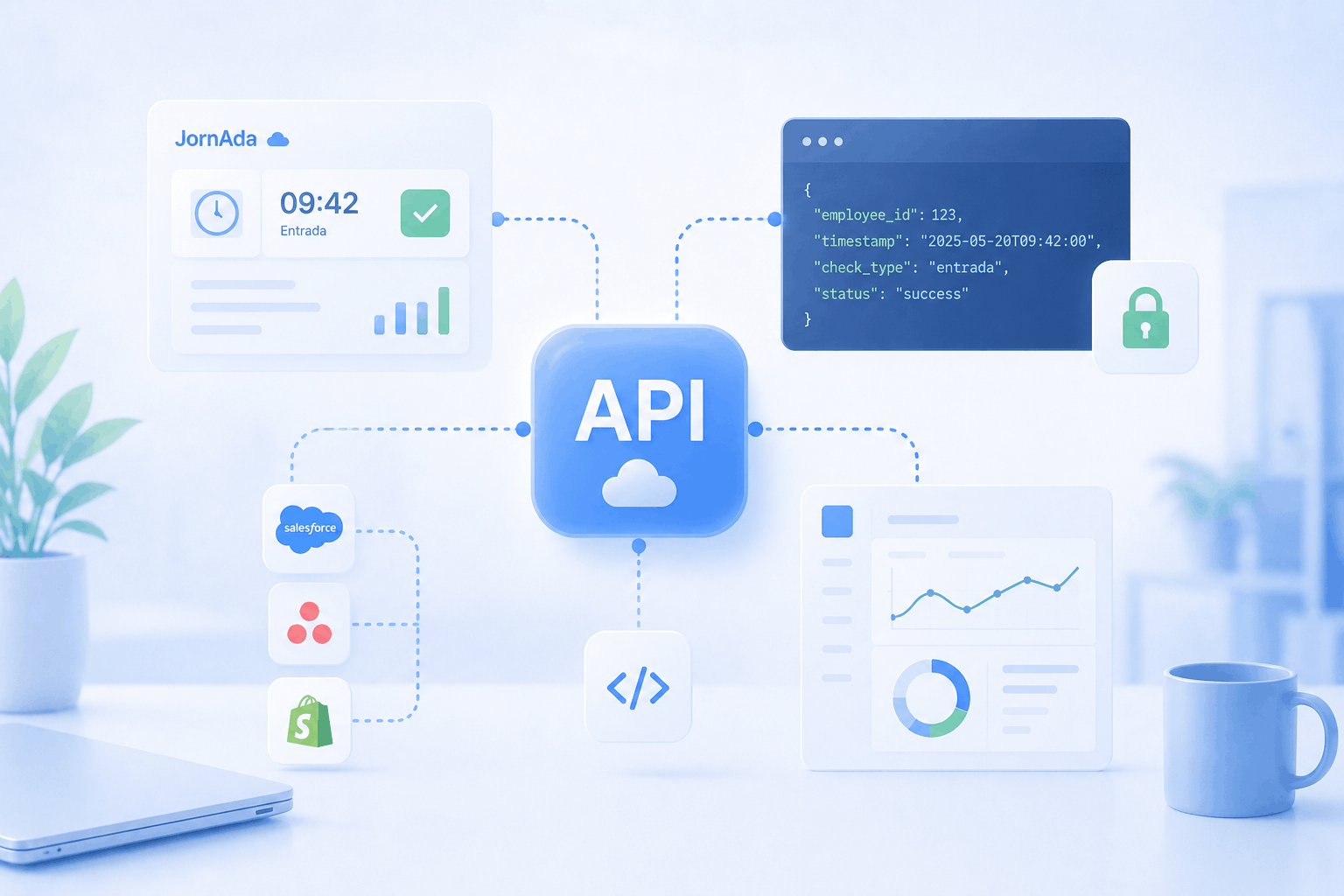
Today is a big day for every Technology, Systems and Integrations team working with JornAda. We are launching the JornAda REST API: a public, secure and documented interface that lets your company connect time tracking, workday, absence and time-balance data with any internal system. No manual exports. No end-of-month CSVs. No copy-pasting between platforms.
If you lead a Technology, Systems, People Analytics or HRIS function, this is the missing piece that turns time tracking into part of your stack: feed your Business Intelligence dashboards, your data warehouse, your HRIS or your payroll software with real, up-to-date data straight from JornAda.
If you landed here searching for "time tracking API", "attendance API", "clock-in API" or "HR data API", this guide explains everything the API can do today, which systems it connects with and how to get started.
Table of contents
What the JornAda API is
The JornAda API is a REST interface that returns responses in JSON over HTTPS. With it, your applications read and record time-tracking data programmatically, without going through the web app or the mobile app.
It is built on widely adopted industry standards and designed for production from day one: JSON responses, key-based authentication, pagination for large volumes and versioning in the path (every endpoint lives under /api/v1) so your integrations do not break when we ship new features.
Three ideas to understand it at a glance:
- Your company's data only: each API key is tied to a single company. Every request returns only your organisation's information; you will never see third-party data nor expose yours.
- Read for almost everything, write for clock-ins: most operations are read-only (GET). The only write operation is recording a clock-in or clock-out (POST), built for integrations with your own devices and attendance systems.
- Included in your plan: the API is part of the product and works while your subscription is active. It is not an enterprise add-on sold separately.
The base URL is https://api.jorn-ada.com/api/v1, and the interactive documentation, with every parameter and response, is in the JornAda API Swagger documentation.
A read API with a single, controlled write operation: why
This is a deliberate design decision, and the question we get asked the most. The API exposes all of your company's information in read mode and reserves writing for a single operation: clocking in and out. We have three reasons.
The first is data security. By limiting writing to one tightly scoped operation, entire categories of risk disappear: an integration cannot delete workday records, rewrite the past or create phantom structures. That matters a lot when we are talking about labour data subject to the Labour Inspectorate and to GDPR.
The second is the integrity of the time record. Spanish time-registration law requires every change to be traced with a timestamp and an author. That is why corrections still go through the JornAda interface, where they are audited, instead of opening the door to automated bulk changes. For the legal detail, read our guide to the new time-tracking law in Spain.
The third is what our customers actually need. When we talk to corporations with thousands of employees and to labour advisories managing hundreds of companies, the vast majority of use cases are read-based: feeding dashboards, integrating with analytics systems, cross-referencing payroll data, loading a data warehouse. The one recurring write case —clocking in from a device or an in-house system— is already covered.
Who it is built for
The JornAda API hits the mark for three profiles.
The first is large companies and corporations with hundreds or thousands of employees that already run their own stack (HRIS, ERP, Business Intelligence tools, data lakes) and need JornAda to be part of that ecosystem without friction.
The second is labour advisories and payroll bureaus that manage dozens or hundreds of client companies and need to automate the extraction of hours and absences to feed their payroll software, CRM or internal reports.
The third is People Analytics teams building models on productivity, absenteeism and workday patterns, who need a reliable, always-current data source.
If you are not in any of these profiles, no problem: JornAda works perfectly without touching the API. The web interface covers 100% of the needs of SMBs and mid-sized companies that do not require programmatic integrations.
What data you can read
The API exposes the data that really drives people management, organised by domain. In its current version you can access:
- Employees: each person's master record (national ID, social security number, job category, work site, seniority date, language, clock-in method...). Access data such as the password is never exposed.
- Clock-ins: each daily workday with its entry and exit segments, the method used to clock in and the correction history.
- Absences: holidays, sick leave, permits and medical appointments, with their approval status.
- Time balance: the difference between expected hours and hours actually worked, per employee, site or period.
Endpoints available today
These are the resources the API exposes in version 1, with their most useful filters.
Employees — GET /api/v1/users
Returns your company's headcount with each employee's record: national ID, social security number, employee code, email, phone, language, work site, job category, seniority date and status (active or inactive). It is the perfect source to sync your HRIS without duplicating work.
- active: filter by active or inactive employees.
- siteId: return only the employees of a specific work site.
- Key point: each employee's _id field is the identifier you will use as userId in the rest of the queries.
GET https://api.jorn-ada.com/api/v1/users?active=true
Clock-ins — GET /api/v1/days
Returns the recorded workdays: which days each employee worked and at what times they clocked in and out. Each result is one person's workday on a date.
- Several segments per workday: a workday can have several segments (morning and afternoon), each with its own entry and exit time. If a segment has no exit, the employee has not clocked out yet.
- How they clocked in: each segment indicates the method: mobile app, web, RFID card, PIN, code, automatic or imported. Geolocation is included when available.
- Automatic closures: the system flags segments it closed because the employee forgot to clock out.
- Corrections: the history records change requests and their status (pending, approved or rejected).
- Filters: by employee (userId) and by date range (startDate and endDate, in YYYY-MM-DD format).
GET https://api.jorn-ada.com/api/v1/days?startDate=2026-01-01&endDate=2026-01-31
Clock in or out — POST /api/v1/days/clock
The only write endpoint. It records a clock-in for an employee from your own systems (a turnstile, a tablet, a production ERP). It works like a switch: if the employee has no open segment, it records the entry; if they already have one, it records the exit.
- Identification: provide userId or employeeCode (one of the two). The employee must belong to your company and be active.
- The server sets the time at the moment of the request; you cannot send an arbitrary time. For historical loads, use the managed import, not this endpoint.
- Optional geolocation and a configurable time zone (Europe/Madrid by default).
- Same rules as any clock-in: if the employee has the "api" method blocked, is outside allowed hours or the segment overlaps, the operation is rejected. The method is recorded as "api".
POST https://api.jorn-ada.com/api/v1/days/clock
Absences — GET /api/v1/holidays
Returns your employees' absences. And note, these are not just holidays: also sick leave, medical appointments and paid permits. Each absence shows whether it is approved, rejected or pending. They map to the platform's absence and holiday management.
- Filters: by employee (userId) and by date range, ideal to know who is off during a given period.
GET https://api.jorn-ada.com/api/v1/holidays?startDate=2026-01-01&endDate=2026-01-31
Time balance — GET /api/v1/report/balance
Returns the time balance: the difference between the hours each employee was supposed to work according to their schedule and the hours they actually clocked. A positive balance means extra hours; a negative one, hours owed. It is the basis of JornAda's time-balance reports.
- Required range: set the period with from and to.
- Filters: by employee (userId) or by work site (siteId).
- Typical use: calculate overtime or shortfall at month-end before running payroll.
GET https://api.jorn-ada.com/api/v1/report/balance?from=2026-01-01&to=2026-01-31
Real-world use cases
With these resources —employees, clock-ins, absences and time balance— we are already solving high-value scenarios in large companies.
Real-time Business Intelligence dashboards
Connect the API to your BI tool to display hours worked, absenteeism by department or productivity by site, always up to date. The leadership team opens the dashboard every Monday without anyone building the report by hand.
Feeding your data warehouse or data lake
If you run Snowflake, BigQuery, Redshift or a data lake, the API lets you ingest workday and absence data and cross-reference it with your internal sources: sales, production, costs. That is where the real insights appear.
Syncing with your corporate HRIS
The API syncs the employee record and their workday data with your master HRIS, avoiding duplicated information and manual processes.
Automating payroll calculation
For advisories and companies with in-house payroll, the API supplies the real hours, overtime and absences that feed the calculation. What used to be hours of exporting and validating becomes an automatic process. It fits JornAda's smart payroll.
Reporting for the Labour Inspectorate
The API lets you extract consolidated records to build the reports the regulation requires, while keeping the JornAda interface as the point of audit and modification.
People Analytics
People Analytics teams use the API as a primary source for turnover, absenteeism and workday-pattern models, combining it with their own data sources.
Clocking in from your devices
With the clock-in endpoint, you integrate turnstiles, tablets or a production ERP so they record entries and exits straight into JornAda, without the employee opening the app.
Multi-site consolidation
If you have several sites or group companies, the API lets you read and consolidate the data with segmentation by work site.
How it integrates with your stack
The JornAda API is agnostic about the tool consuming it: any system able to make HTTP REST requests and read JSON can integrate. You do not need a proprietary connector or a special format. From there, these are the most common integration patterns in large companies.
Business Intelligence: Power BI, Tableau and Looker Studio
The three major BI platforms consume REST APIs natively. Power BI connects with its "Web" connector, setting the header with your API key and scheduling automatic refresh. Tableau consumes the API via its Web Data Connector or an intermediate REST layer, on both Desktop and Cloud. And Looker Studio works well using BigQuery as an intermediary: a job periodically loads the data into BigQuery and Looker consumes it with optimal performance.
Data warehouse: Snowflake, BigQuery, Redshift
The usual pattern is a scheduled job (for example with Airflow, Cloud Functions or Cloud Run) that periodically extracts the data from the API and loads it into your warehouse. Once in Snowflake, BigQuery, Redshift or a data lake on S3, Azure Blob or Google Cloud Storage, your data teams cross workday data with any other source. Since the API returns standard JSON, transforming it to Parquet or any analytical format is trivial.
HRIS and payroll: SAP, Workday, BambooHR, A3, Sage
Your team can consume the endpoints directly or through integration middleware (MuleSoft, Boomi, SAP Integration Suite) to orchestrate the flow toward your master HRIS: SAP SuccessFactors, Workday, Oracle HCM, BambooHR or Personio. For the payroll side, the API supplies the hours and absences that feed A3, Sage, Holded, Nominasol and other suites in the Spanish market, with an automatic daily load and the monthly close ready to go. If you are comparing HR suites, you will want our guide to alternatives to Factorial, Sesame, Bizneo, Personio and Kenjo.
Authentication, keys and access control
The API authenticates with an API key sent in the x-api-key header. No usernames or passwords are used: the key identifies your company.
x-api-key: your-api-key
The essentials of credential management:
- Self-service: the administrator generates the key from the JornAda panel, under Backoffice → Integrations, clicking "Create".
- Shown only once: for security, the full key appears only at creation time. Copy it and store it in a secrets manager.
- Multiple keys: you can create more than one to separate integrations (for example, one for BI and another for payroll) and revoke them independently.
- Revocable and non-expiring: the key does not expire, but you can revoke it instantly if you suspect it has been compromised, without affecting the others.
In addition, each employee can have the "api" clock-in method blocked, so that only the people you choose are recorded through this channel.
Limits, pagination and versioning
To guarantee platform stability and fair performance for everyone, the API applies reasonable, transparent limits.
- Rate limiting: up to 300 requests every 15 minutes per IP. When exceeded, the API returns HTTP 429 indicating how many seconds to wait before retrying.
- Control headers: every response includes X-RateLimit-Limit, X-RateLimit-Remaining and X-RateLimit-Reset, so your integration always knows how many requests remain and when the counter resets.
- Pagination: lists are returned by pages. Use page to choose the page and limit to set how many results you want (maximum 500 per page). The response always includes the total.
- Versioning in the path: every endpoint lives under /api/v1. Any breaking change will happen in a new version, keeping the previous one. New fields and endpoints are added in a backward-compatible way: you do not need to touch anything for what you already have to keep working.
- Usage metering: every call is logged and counted (IP, company and endpoint), which lets us support you with real context.
Security, GDPR and compliance
Your Systems team and Legal department will have questions. Here are the answers, no fluff.
- Per-company isolation: each key only accesses its own company's data. Segmentation is strict.
- Encryption in transit: all requests are made over HTTPS. Unencrypted connections are not valid.
- Servers in the European Union: JornAda's infrastructure is hosted in the EU (AWS, Spain region) and time records are kept within the European Economic Area for the legal period.
- No biometrics: JornAda uses no fingerprint or facial recognition, so the API exposes no biometric data. To understand why this matters, read why fingerprints are no longer legal for clocking in.
- Credentials are never exposed: the endpoints never return passwords or access data.
- Time-record integrity: being read-only except for clock-ins, the API cannot alter or delete records, which preserves the immutability required by Royal Decree-Law 8/2019.
- Processing compliant with GDPR and the Spanish LOPDGDD: the accessible data is exclusively labour and workday data, under the legal basis of time-registration compliance.
How to get started in 5 steps
- 1. Generate your key: open the JornAda panel, go to Integrations and create an API key. Copy it as soon as it appears.
- 2. Explore the documentation: open the Swagger documentation, where you can see every parameter and test the calls live.
- 3. Identify your employees: start by calling /users to get the _id values you will use in the rest of the endpoints.
- 4. Build your first integration: pick a small, low-risk case (a weekly dashboard, a daily absence sync) and validate it before scaling.
- 5. Scale with control: use the rate-limit headers to tune your call frequency and apply retries with backoff when you receive a 429.
If you do not use JornAda yet and want to connect your time tracking with your software, you can start your free trial or check our plans and pricing.
Where the API is heading
The current version covers full reading of your data plus clock-ins from external systems. From here we will keep expanding it by listening to the technical teams that use it. When we add new capabilities, we will announce them on this same blog and ship them while keeping versioning and backward compatibility, so your existing integrations never break. If there is an operation or resource your company needs, tell us: our customers' requests set the priority order.
Frequently asked questions about the JornAda API
What kind of API is it?
It is a REST API that returns JSON over HTTPS, authenticated with a key in the x-api-key header and versioned at /api/v1. The base URL is https://api.jorn-ada.com/api/v1.
Does it cost extra?
No. The API is included in your JornAda plan and works while your subscription is active. It is not an add-on sold separately.
Is it read-only?
Almost. Every endpoint is read-only except one: clocking in and out (POST /api/v1/days/clock), built to record attendance from your own systems. Every other change still goes through the JornAda interface, where it is audited.
How do I get a key?
The administrator generates it under Backoffice → Integrations by clicking "Create". The full key is shown only once, so copy it immediately. You can create several and revoke them whenever you want.
Does the API expose other companies' data?
No. Each key is tied to a single company and every query returns exclusively that company's data.
Do I need a developer?
For integrations with HRIS, ERP or data warehouses, yes. For simple cases such as a Power BI dashboard, your Systems team can set it up in a few hours with the public documentation.
What happens if I exceed the request limit?
The API responds with a 429 code and indicates how many seconds to wait. Use the X-RateLimit headers to regulate frequency and apply exponential backoff retries.
Does it work if my company operates internationally?
Yes. The API is reachable over HTTPS from anywhere and supports employees with different countries, languages and time zones.
Can I integrate with systems not listed in this article?
Yes. The API is agnostic: any tool able to make HTTP REST requests can integrate. If you need a specific pattern, our technical team can advise you.
More questions? Check our FAQ section or contact our team.
Activate the API today
The companies that will get the most out of time tracking in the coming years will not be the ones with the most complex software, but the ones that know how to integrate it into the rest of their stack, generate intelligence from their data and automate everything that can be automated.
The JornAda API is the missing piece to join that group: no extra cost, no complex contracts and no custom development. Generate your key from Integrations and take a look at the full documentation to start integrating today.
Prefer to see it applied to your company? Book a 30-minute technical session with our team, message us on WhatsApp at +34 696 362 327 or talk to our team. And if you want more context, explore our blog on time tracking, digital clock-in and HR management.