Automated HR reports generated by AI

Ask the assistant once and forget about it: every hour, day, week or month the AI generates the report with your real data and delivers it in the app, by email or as a PDF to whoever you decide.

Try for free✓ 15 days free  ·  No card required
Automated HR reports generated by AI

Schedule it in natural language

Write "every Monday at 9 send me the team's worked hours" and the assistant creates the recurring task. Before activating it, it tests the result to guarantee the report works.

Any frequency you need

Every hour, every day, every week (on the days you choose), every month or every year. You decide the exact moment and JornAda generates and delivers the report on time.

Personalized reports per employee

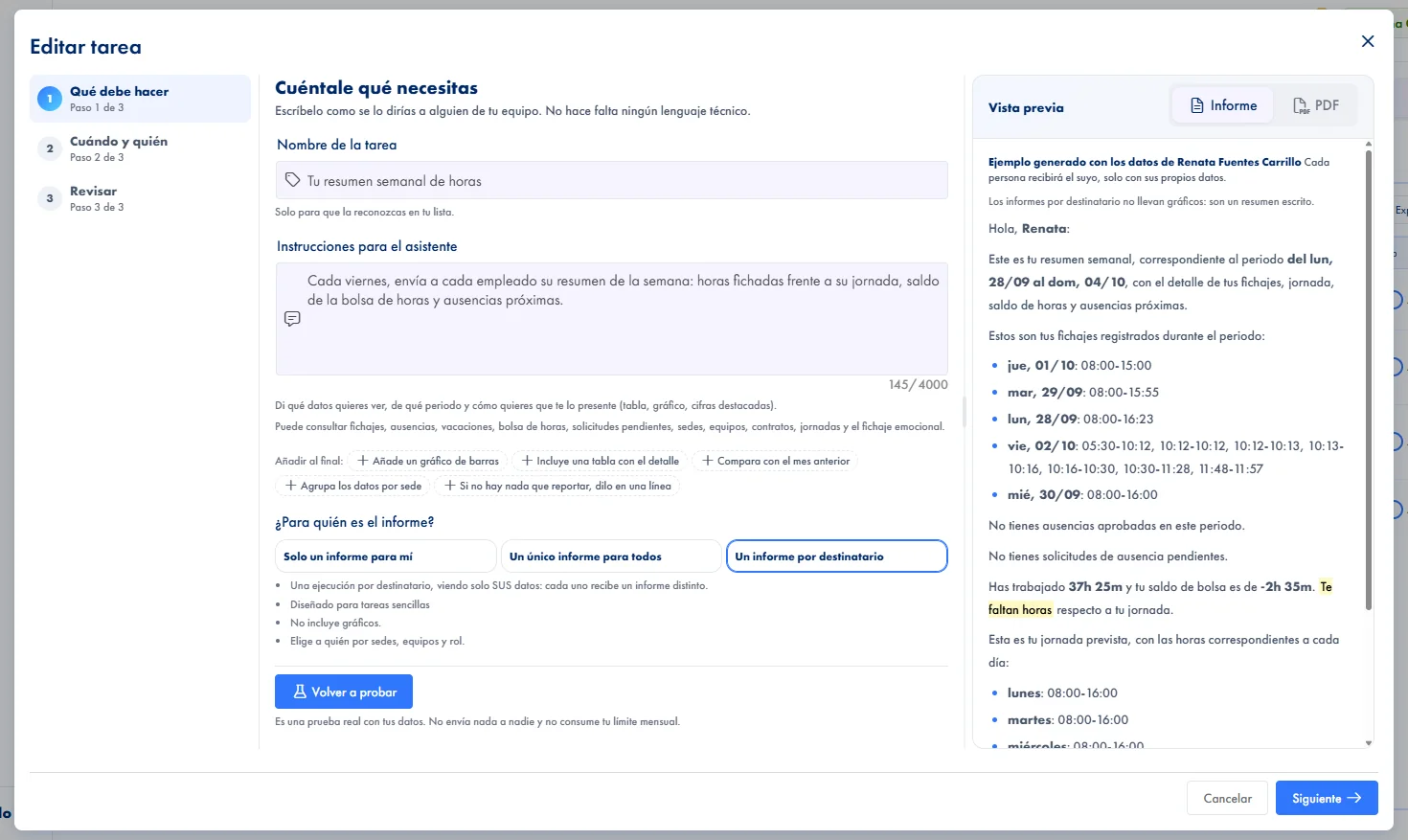
Three delivery modes: a personal report for you, a company report for administrators, or a personalized report where each employee receives only their own data.

Multichannel delivery: app, email, push and PDF

The report always arrives as an in-app alert and, if you want, also by email with a push notification and a downloadable PDF attachment.

Recipients by sites and teams

Send each report to the whole company or narrow it down by sites and teams. Every recipient gets it written in their language, Spanish or English.

Real data with charts included

Reports include indicators, tables and charts generated from your real check-ins, hours and absences. Conclusions based on data, not guesswork.

How it works

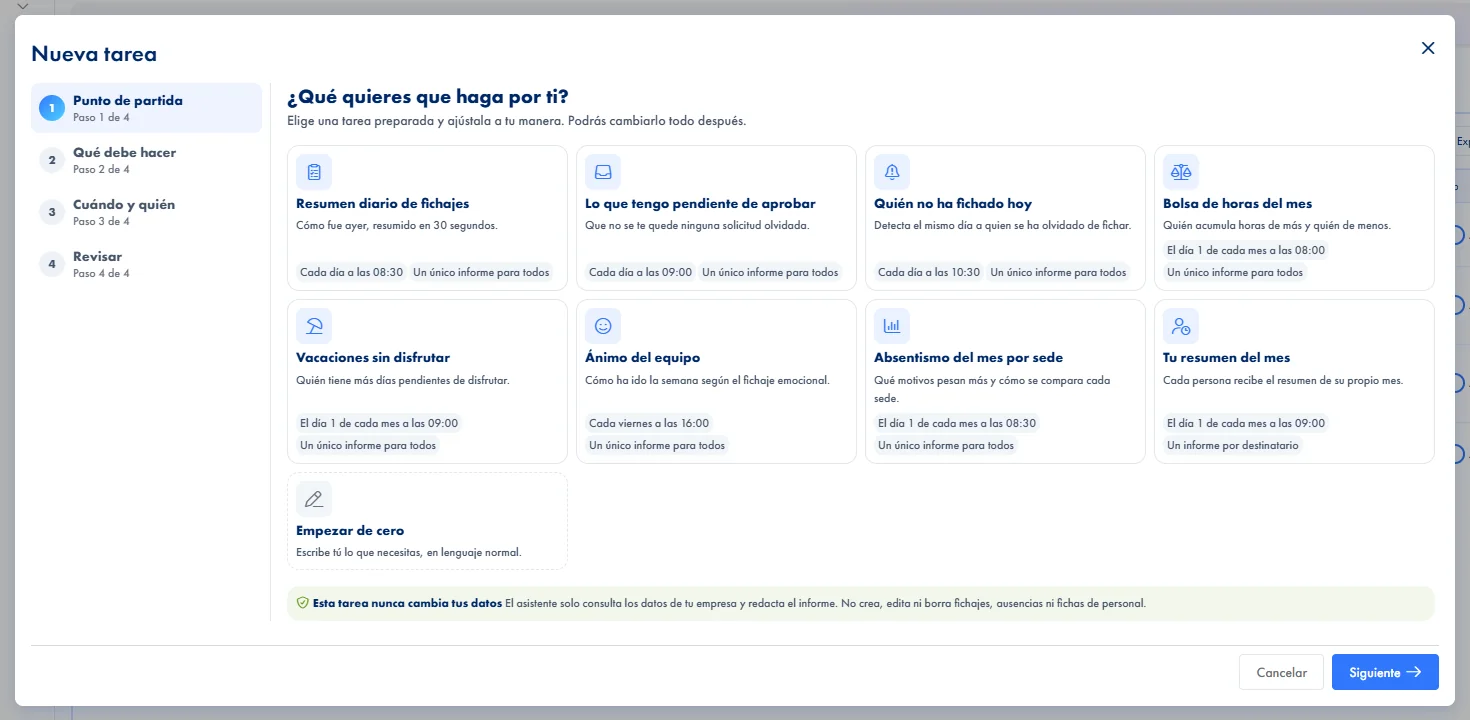
How JornAda's automated reports work

  1. You choose who receives the report

    Three scopes: just for you, the same report for the admins you choose, or one per person with their own data.

  2. You write what it should do, in natural language

    A text field where you describe what you want to know, for example a weekly summary of who has not clocked in.

  3. You test it before saving

    The Test button runs the instruction against your real data and shows you the result. Without a successful test it cannot be saved.

  4. It runs on its own and delivers

    Hourly, daily, weekly, monthly or yearly. Each report lands in the alerts inbox and, if you want, by email with the PDF attached.

One report per recipient, each with their own data

The most useful mode runs the same instruction once per person, scoped to their data, up to a thousand recipients: every manager gets their part and does not see anyone else's. In exchange, that mode only describes or summarises, it does not analyse or compare, and it carries no charts. The product warns you when you pick it, not on the first send.

One report per recipient, each with their own data

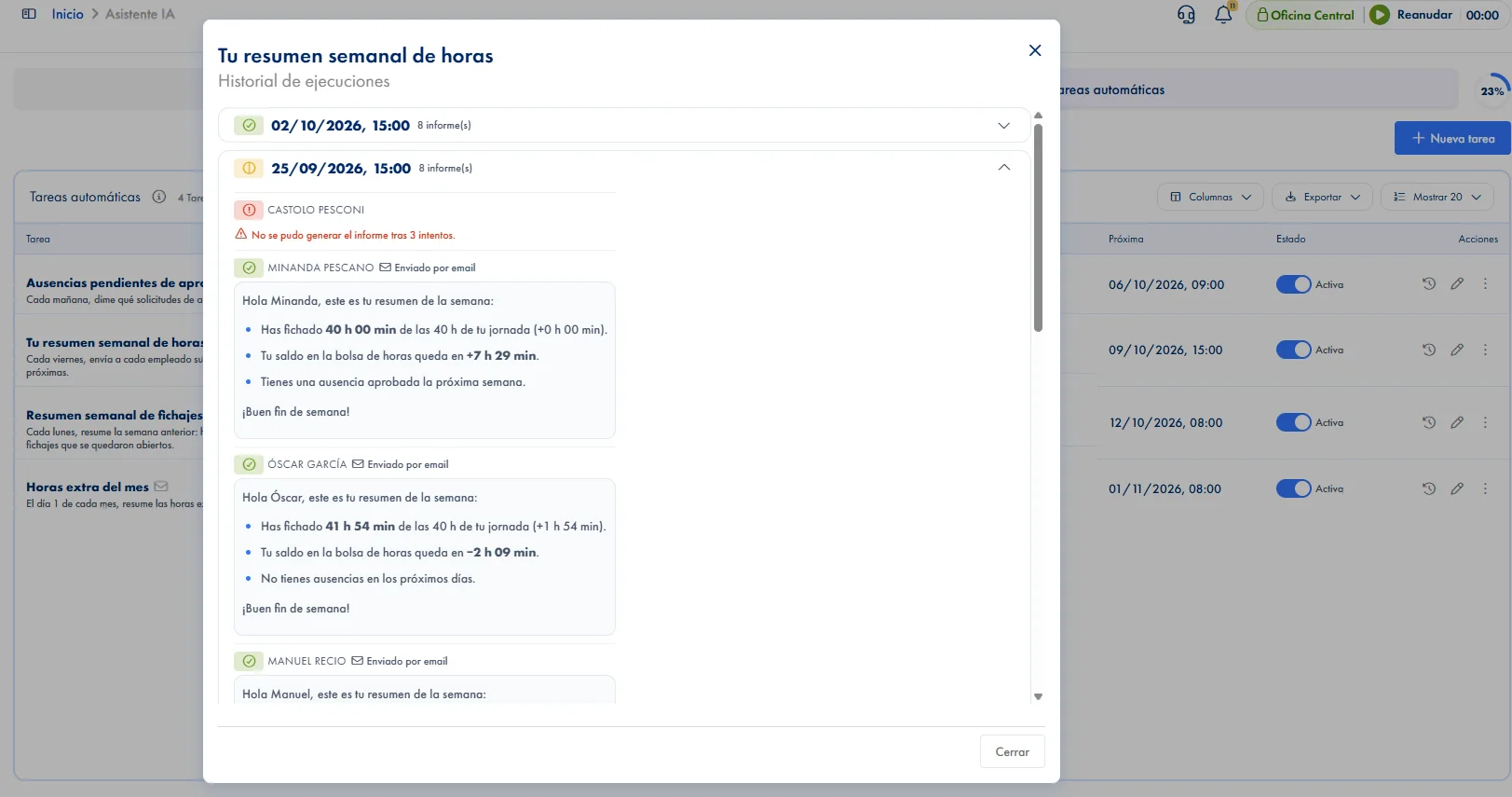
You know the report arrived, and to whom

A report that fails is retried three times. The history keeps ninety days with the last twenty runs of each task, and opening one shows the recipient, whether the email went out, the error if there was one and the text that was generated. Without having to ask anyone.

You know the report arrived, and to whom

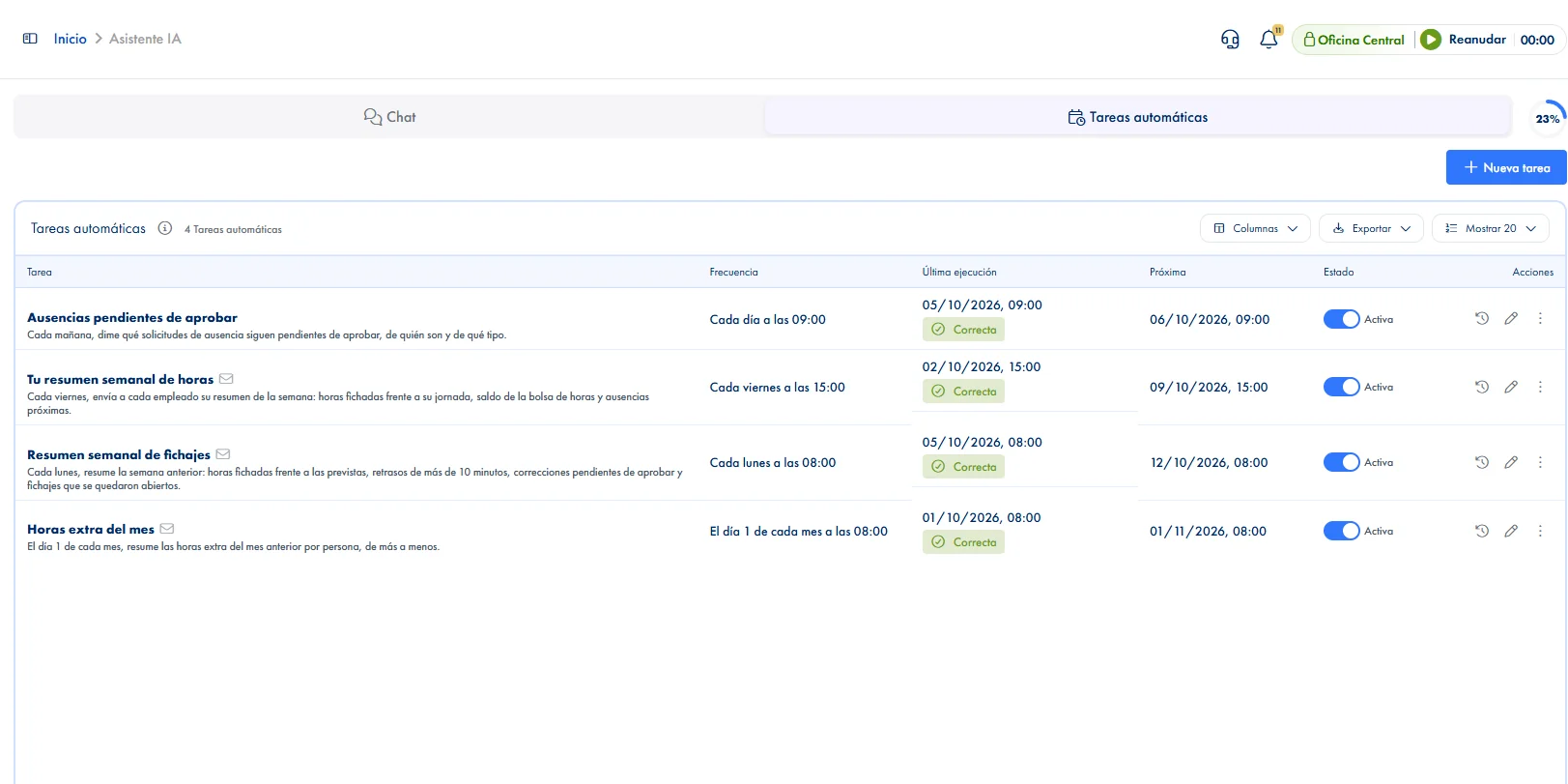
Frequencies, delivery and plan limits

The free plan allows one active task, weekly, monthly or yearly. With the assistant add-on it is twenty, and daily and hourly are added. Creating has no cap: past the maximum, the new one is saved paused. And an automated task never writes anything in your company: it reads and it drafts.

Frequencies, delivery and plan limits
Common questions

Frequently asked questions about automated reports

Can't find your answer?

Write to us and we will help you sort it out.

Contact us

Yes: the same instruction runs once per person, scoped to their data, up to a thousand recipients per run. In exchange, that mode only describes or summarises, it does not analyse, and it carries no charts.

Yes, it is required. Test runs the instruction against your real data and shows the result; until one comes back clean, it cannot be saved. If you then change the instruction or the scope, you have to run it again.

No. It reads and it drafts, nothing more. If you want a change applied, you do it from the chat with its confirmation card, or from the screen it belongs to. It does not search the product documentation either: it only looks at your company's data.

One on the free plan, weekly, monthly or yearly. Twenty with the assistant add-on, which also enables daily and hourly. Creating tasks is not limited: if you go past the maximum active, the new one is saved paused and you choose which one to switch on.

A failure is retried three times and is recorded with its error in the history. If what is missing is AI budget, the task does not fail: it is postponed without consuming and comes back on its own at renewal. The reports skipped meanwhile are not recovered later.

Besides the templates, there is a free text field where you describe what you want to know, so the report fits your question rather than a catalogue. It can look at clock-ins, absences, the hours balance, contracts, the assigned schedule and the employee record. A typical example: a weekly summary of who has not clocked in, every Monday first thing.

It always lands as an alert inside JornAda, so it is not lost even if nobody checks their email. The push alert is on by default; the email and the attached PDF are switched on if you want them, and they are independent: you can have the report downloadable from the alert without sending any email at all. The app receives them too, though tasks are created from the web.

Recipients are chosen by site, team and role, not one by one, so a company of two hundred people does not mean ticking two hundred boxes. There are three scopes: just for you, the same report for the admins you choose, or one per person with their own data, which reaches up to a thousand recipients per run.

Yes. In the list each task has its switch to pause it and turn it back on, and the frequency is described in words rather than a technical expression, so you can see at a glance when it runs. If you edit the instruction or the scope, the earlier test stops counting and has to be run again before saving: nothing keeps running that you have not seen.

In the history. It keeps ninety days and the last twenty runs of each task, and opening one shows the recipient, whether the email went out, the error if there was one and the text that was generated. That is the difference between assuming it arrived and checking, without asking anyone or digging through email.

Hourly, daily, weekly picking the days, monthly picking the day of the month, or yearly. By default it goes out at nine in the morning. In the list the frequency is described in words rather than a technical expression, and the last and next run dates are shown in the task's timezone, not in the browser's. The free plan goes up to weekly; daily and hourly come with the assistant add-on.

Automate your company reports starting today

Ask the assistant once and forget about it: every hour, day, week or month the AI generates the report with your real data and delivers it in the app, by email or as a PDF to whoever you decide.