Total control over your team's overtime

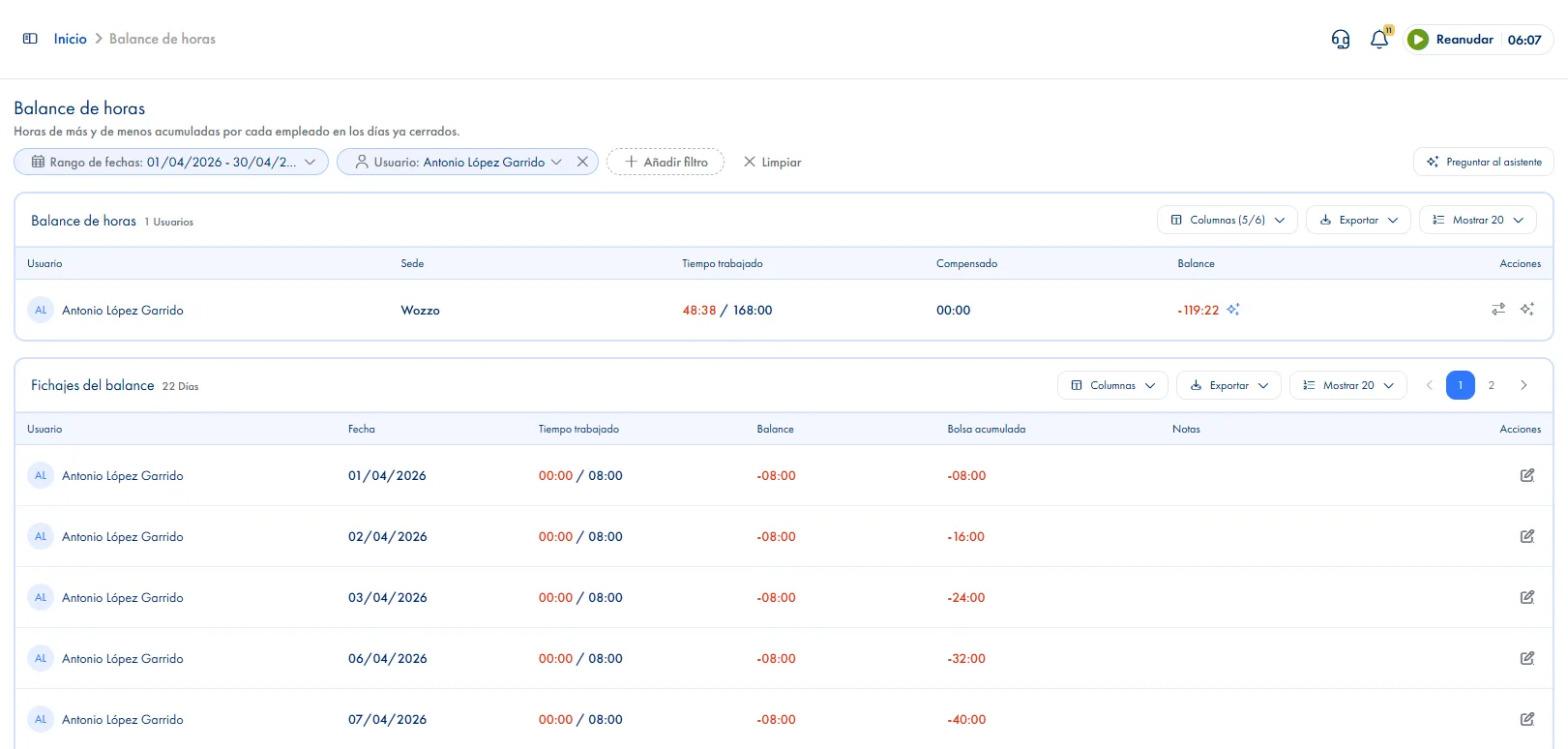
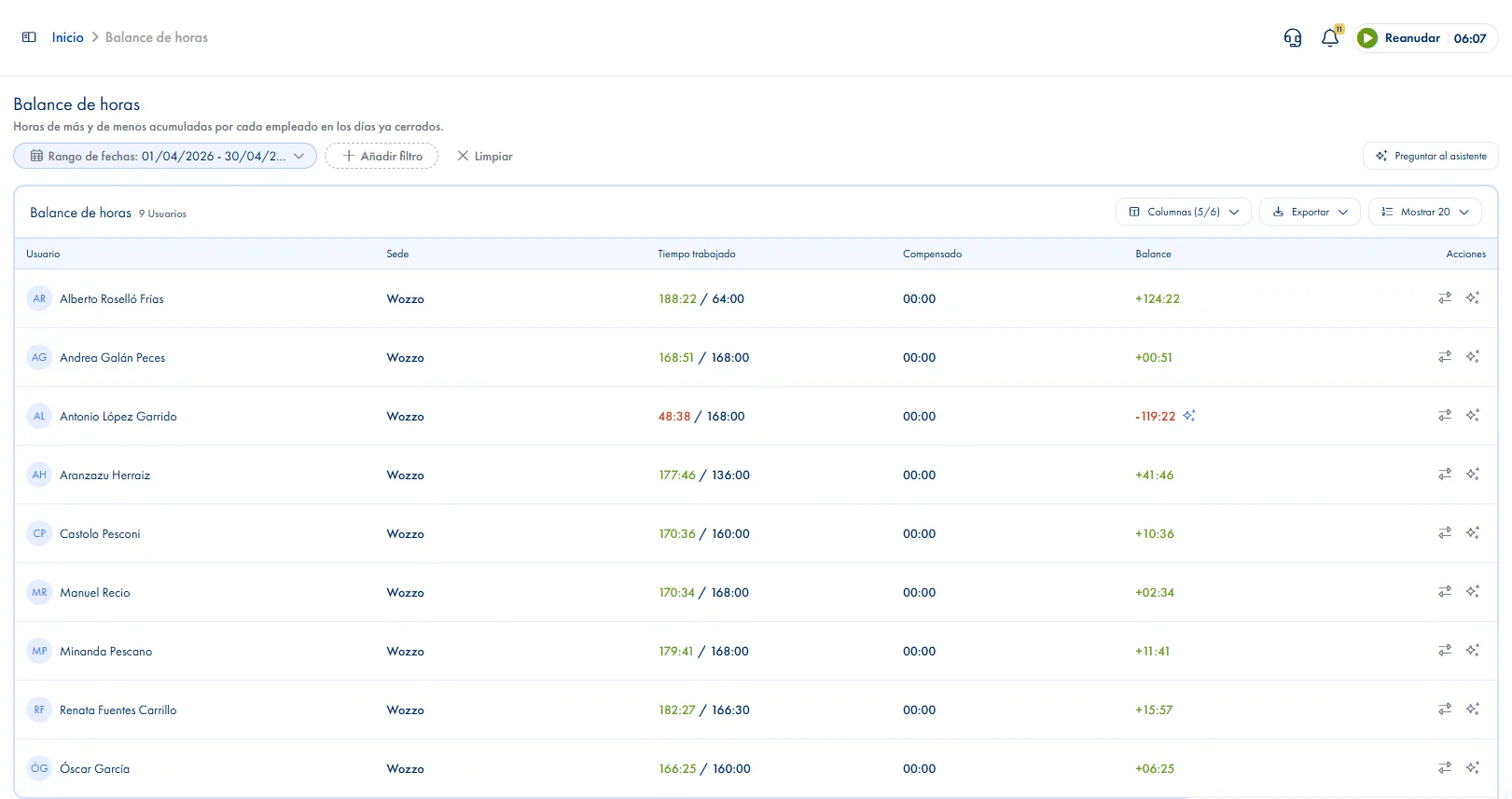
JornAda automatically calculates the balance between hours worked and hours expected. Manage time bank, economic compensation and generate individual reports.

Try for free✓ 15 days free  ·  No card required
Total control over your team's overtimeTotal control over your team's overtime

Worked vs. expected balance

JornAda compares real hours worked with expected hours based on contract and assigned schedule, taking holidays and absences into account.

Time bank

Accumulate or deduct hours in each employee's time bank. Manage time credits and debits centrally.

Economic compensation

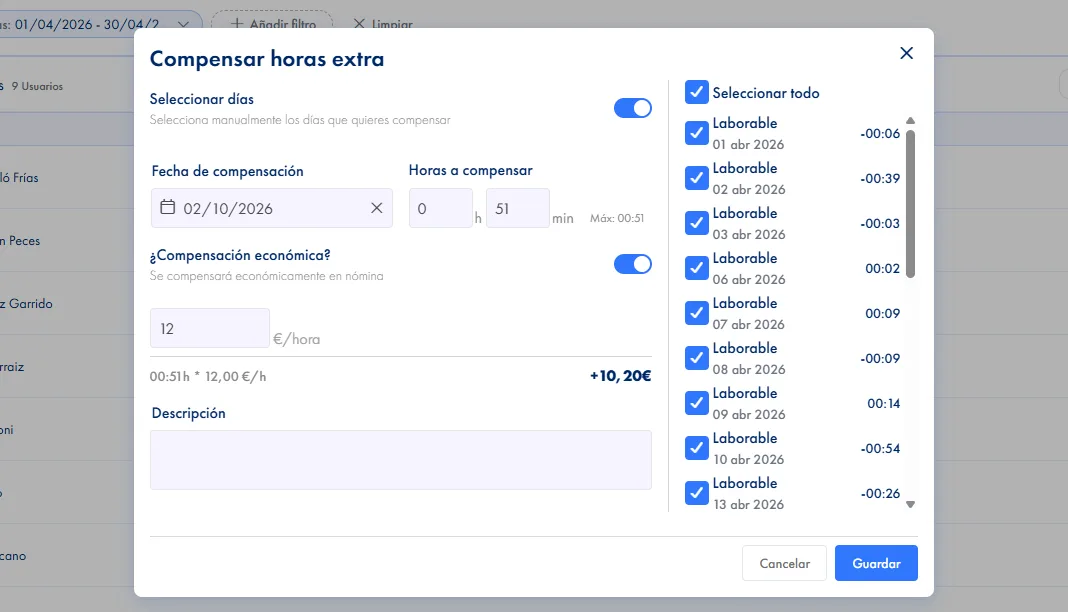
Record economic compensation for overtime and deduct from the balance. Fully integrated with expected hours calculations.

Configurable courtesy window

Set a courtesy window (±X minutes) that automatically rounds clock-ins to the scheduled time.

Individual PDF report per employee

Generate and download each employee's time balance in PDF. Perfect for team reviews or HR department.

Full-year paginated view

Browse the time balance history month by month for each employee. Quickly identify who is accumulating the most hours.

How it works

How the time bank works in JornAda

  1. JornAda walks the period day by day

    Day by day, it compares the hours their schedule expects with the hours they clocked. Today is left out: mid-morning would always look short.

  2. It applies the courtesy time

    If the clock-in or clock-out falls inside the company's courtesy margin, it counts as done on time.

  3. It shows the balance with a sign

    Green when there is time over and red when it is short, with the per-employee summary and the clock-ins behind it. Exports to CSV and PDF.

  4. You compensate the gap

    You record the date, the hours and the reason. JornAda allocates them to specific days and the balance drops immediately.

The balance is calculated, not stored

Hours worked minus hours expected minus compensations, walking day by day through the whole period. There is no nightly job to wait for: a clock-in corrected yesterday shows up today. And the expected hours come from the schedule that person had assigned on that date, not from the schedule as it stands now.

The balance is calculated, not stored

Why a negative sometimes appears out of nowhere

A day with expected hours and no clock-in subtracts, even though it does not appear in the detail table: that is the most common cause. Approved full-day absences do remove that day's hours, and partial ones only their slot, but four unpaid types deliberately remove nothing: there the time stays owed.

Why a negative sometimes appears out of nowhere

Compensate in time or in money

Compensating is not subtracting from a counter: each compensation is allocated to the specific days that generated it, and those days show up that way in reports. It can be time taken back or money paid out, by giving an hourly rate. Creating or editing a compensation is admin only; each employee sees their own balance.

Compensate in time or in money
Common questions

Frequently asked questions about the time bank

Can't find your answer?

Write to us and we will help you sort it out.

Contact us

Because half a day would give a misleading balance: at eleven in the morning it would always look short. The calculation excludes today and any future day, and the query range trims itself to yesterday. That is why you will not find Today or Yesterday among the preset periods.

Because they measure different things on purpose. The hours balance applies the company's courtesy margin; reports show the hours as clocked. With a ten-minute courtesy, a clock-in at 9:07 counts as 9:00 in the balance and as 9:07 in the report.

Yes, if that day had expected hours and was not covered by an approved absence or a public holiday at their site. Rest days do not subtract because they have no expected hours, and flexible days have a zero balance: comparing a single day means nothing when hours are agreed by the week.

Yes. You mark the compensation as paid and give the hourly rate; JornAda works out the amount and records it. It is still allocated to specific days, so reports make it clear which days were paid and how many hours from each.

No. There is no expiry and no weekly, monthly or yearly period close: the period is simply the date range you query. Whatever is left uncompensated stays there until someone compensates it, and negative balances are compensated the same way as positive ones.

Each employee sees their own, on the web and in the app. A manager with permission to see their team's clock-ins can view and export their people's balance, but cannot compensate. Creating or editing a compensation is company admin only. It is the same logic as everywhere else in the product: what you see depends on your role and your teams, not on which screen you open.

From this week back to last year, with this year set by default. The range always trims to yesterday, because today would give a misleading balance. There are no weekly or monthly closes to run: the period is simply the range you choose, and the balance is recalculated in full every time you query it.

Yes. You say how many hours you want to compensate and JornAda caps them at the available balance, shown right under the field so nothing has to be worked out. It then allocates those hours across specific days, either automatically or by you picking them one by one. If you pick by hand, the days you mark have to add up exactly, because each selected day goes in whole.

The compensated hours appear in the report, in their own columns, next to the day they belong to. And opening that day's detail flags that it carries a compensation. That is what lets you explain months later why one particular day adds up the way it does, without reconstructing it from memory.

They are compensated the same way as positive ones: you enter a negative amount and it is on record that the time is considered settled. They do not expire and they are not closed off at month end, so whatever is left unresolved stays there until someone resolves it. And because the balance is recalculated on every query, a clock-in corrected today changes the figure today.

It is a margin of up to sixty minutes that you configure, symmetrical on both sides of the expected time: if someone arrives seven minutes late and your courtesy is ten, it counts as on time. It applies to the first clock-in and the last clock-out, and to breaks between ranges too, but only when the number of closed clock-ins matches the number of expected ranges. Reports do not apply it: there you see the real time.

Do you have your team's hours under control?

JornAda automatically calculates the balance between hours worked and hours expected. Manage time bank, economic compensation and generate individual reports.